Concerts in 2025
I’ve experienced many concerts in my lifetime…
Although the quantity of shows I’ve been to have slowed down, I went to a couple memorable ones that accompanied albums that dropped this year.
1. Fine, Smerz, Urika’s Bedroom (Outline Festival)
Date: Friday, 10/24/25
Venue: Knockdown Center
Location: Brooklyn, NY
Outline’s fifth-annual festival focused on the underground Danish pop scene that has been slowly creeping into the mainstream– catering to the Bushwick natives to which I was part of. Centered around the dreamy sounds made by former students of Copenhagen’s Rhythmic Music Conservatory: Erika, Fine, and Henriette Motzfeldt from Smerz. Clara La San (U.K) and urika’s bedroom (L.A) as additions broadened the context beyond one art school campus, connecting it to a wider indie-pop scene.
I was stoked to finally hear urika’s bedroom’s “big smile, black mire” live for the first time, their music as wide-eyed and intimate, repurposing the tonal fabric of communication breakdown, through drum loop in warped grooves and collapsed textures between their slowed-down trip-hop beats against acoustic guitars. They’ve toured with all recent favorites: Chanel Beads, Nourished by Time, and Youth Lagoon, in between producing and writing songs for fellow California up-and-comers untitled (halo) and Ded Hyatt. I decided on not recording the set to experience their music without distratction, a true treat for the opening set.
Fine:
Following them was Danish singer-songwriter Fine Glindvad Jensen– who recently debuted their 2024 album “rocky top ballads”, which combines organic instrumentation on alt-country-folk fusion to tell a story of a love affair that’s hard to understand. The soundscape is a homage to hearing her bluegrass musician father play his banjo through the wall: “You can hear it,” she recalled in an interview this year, “but you can’t really hear it.” Really dissapointed she skipped playing “I could” though.
Smerz:
Another act that caught my attention was Norwegion duo, Smerz. With their 2025 release of “big city life”, the album describes the intoxicating and rich feelings of a night out in a big city like nyc. Favorites like “you got time and i got money” was recently remixed by MIKE… an insane collaboration toward the end of the year.
2. DERBY
Date: thursday, 10/30/25
Venue: baby’s all right
Location: brooklyn, nyc
If not for a later mentioned artist, DERBY’s freshman album *“slugger” takes the cake as my second favorite album of the year. A lot of influences bleed through this album: Alex G, Frank Ocean, or even Dijon seem as obvious inspirations but don’t feel derivative. Most of the album has pitch-shifted vocals that might steer as off-putting; but his buttery melodies, off-kilter sonic palate, and quixotic romanticism carry through with a touch of dirty realism.
“Move like that” or “Money fight” really stood out as highlights when experiencing the album live, with the audience raging through raw emotions through the rising intensity of melody: disorenting, climax building, sloping and stampeding toward irresolution. It was a two man show: warbly guitars and dry drum kits carrying the whole set, but the venue at Baby’s really made the event authentically intimate.
Sedated loosies like “ultraviolet” (one of my faves) carries one of my favorite lyrical moments:
“Or we could go riding
I look in your eyes and I see it
Ultraviolet
Don’t ever let me go
I already know what your fight is
Make it pure baby, make it pious
Make it kind or make it cruel
As long as you’re trying”
It was one of the few moments where the crowd unfortunately didn’t sing along despite its magical lyrical power, with DERBY saying “don’t worry, we’ll get there eventually”.
3. boylife
Date: monday, 11/1/2025
Venue: nightclub 101
Location: nyc, ny
I’ve been following boylife since their Common Souls day, which felt like a fitting reunion since producer Nick Velez played drums in this small venue. Vocalist Ryan Yoo (boylife) originally pushed out layered & heartfelt eletronic-tinged ballads through classics like “Roots//Habit” or “Arizona”.
Since college, the duo transitioned into solo outfit boylife (despite Nick still producing for him on the side) where in the peak of covid dropped “peas” – possibly my most played song that year. In the song, boylife details the pain of losing a close friend and choosing to move back home as a result. Writing from his parent’s perspective, he attempts to sort out his experience through the eyes of his family, who wanted to help him despite their knowledge of how to do so.
“Where do you go when you close yours eyes? And
Who are you aching for when you dream?
I could peel peaches for when you wake up
No rush, no rush no”
“You must believe in something…”
Although this concert had pretty off-putting audio issues, it was a good reflection on how some of your favorite songs still hit you the same way years later.
4. Dijon
Date: monday, 12/1/2025
Venue: brooklyn paramount
Location: brooklyn, nyc
I’ll make this rather brief since Dijon is still my favorite artist (and has been for the past 6 years)– I still can’t find the words why.
This would mark my fifth time seeing him (I went to see him twice this year in Dallas and Brooklyn), and despite the 10/10 experience, nothing will top the Absolutely journey of 2022 in the jewish synagogue @ Sixth and I in Washington DC.
Dijon is finally getting the mainstream praise he deserves with recent success as co-star to Leo in One Battle After Another, nominated for Producer of the Year for the Grammys, and being Pitchfork Artist of the Year accompanying his sophmore album “Baby”.
The Brooklyn Paramount was the ideal venue for the set: intimate, yet architecturally intricate. Defined by its high ceilings, chandeliers, and spiral staircases, the iconic venue evokes a refined sense of classic NYC theater. What will always remain true with any Dijon set is that in the short hour, nothing else matters but the music.
Scraping Grailed
Recently, I have been selling a large portion of my closet to Grailed, a community marketplace for men’s clothing centered on streetwear & designer.
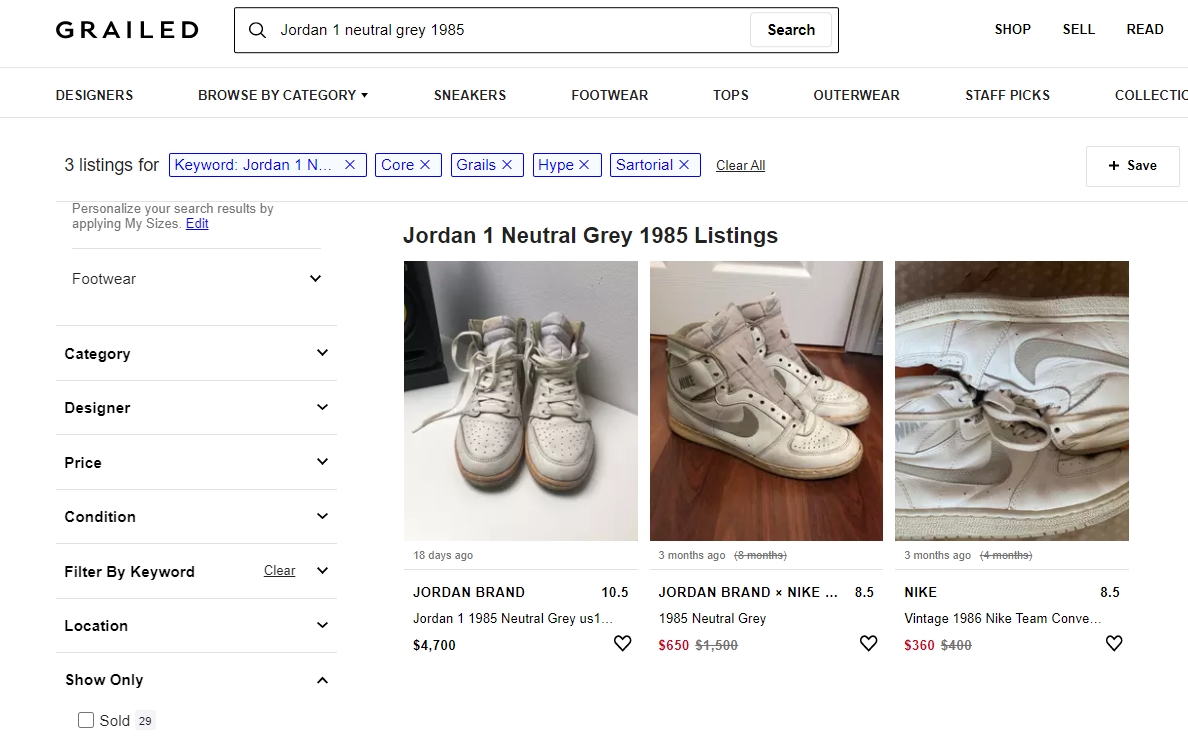
As an avid user of this platform, I find it hard to easily compare prices of current listings versus sold listings of the same item, as you would have to scan through all listings in attempt to capture an overlying trend over time. Thus, it was hard to extrapolate best prices and listing features to sell your item quicker. Unfortunately, Grailed does not have a public API, so I though this would be a perfect opportunity to attempt to scrape relevant features from each listing to visualize fashion trends through data.
Disclaimer: The acceptable use policy for grailed.com does not officially allow for web scrapers or automated processes to gather their data. This project is purely for educational purposes to learn about underlying trends surrounding clothes.
Code can be found on my GitHub.
Selenium & BeautifulSoup:
There are many python packages suitable for web scraping:
BeautifulSoup(will be referred as bs4 for now on )ScrapyRequestsorLXMLSeleniumand a wrapper that makes it easier, Helium.
As a static scraper, Python often requires no more than the use of the Beautiful Soup by traversing the DOM (document object model) to reach its goal. However, static scraping ignores JavaScript and does not really capture other dynamic elements. Thus, automation through Selenium allows these dynamic elements to be clicked on, updating the static page so new information can be scraped.
There are many resources to get started with Selenium and bs4, but I will omit the majority of the set-up and include what was implemented in my code in my GitHub readme. However, I would like to detail some things before getting started:
-
Chrome Webdriver is used: different OS can be used with different browsers for automation through Selenium
-
The first run creates cookies to ignore the log-in element: we use pickle to dump and get previous cookies so Selenium remembers our log-in information for future sessions. Each session on grailed will start at this create account screen that will prevent us from filtering listings, so to avoid this we must remember previous cookies.
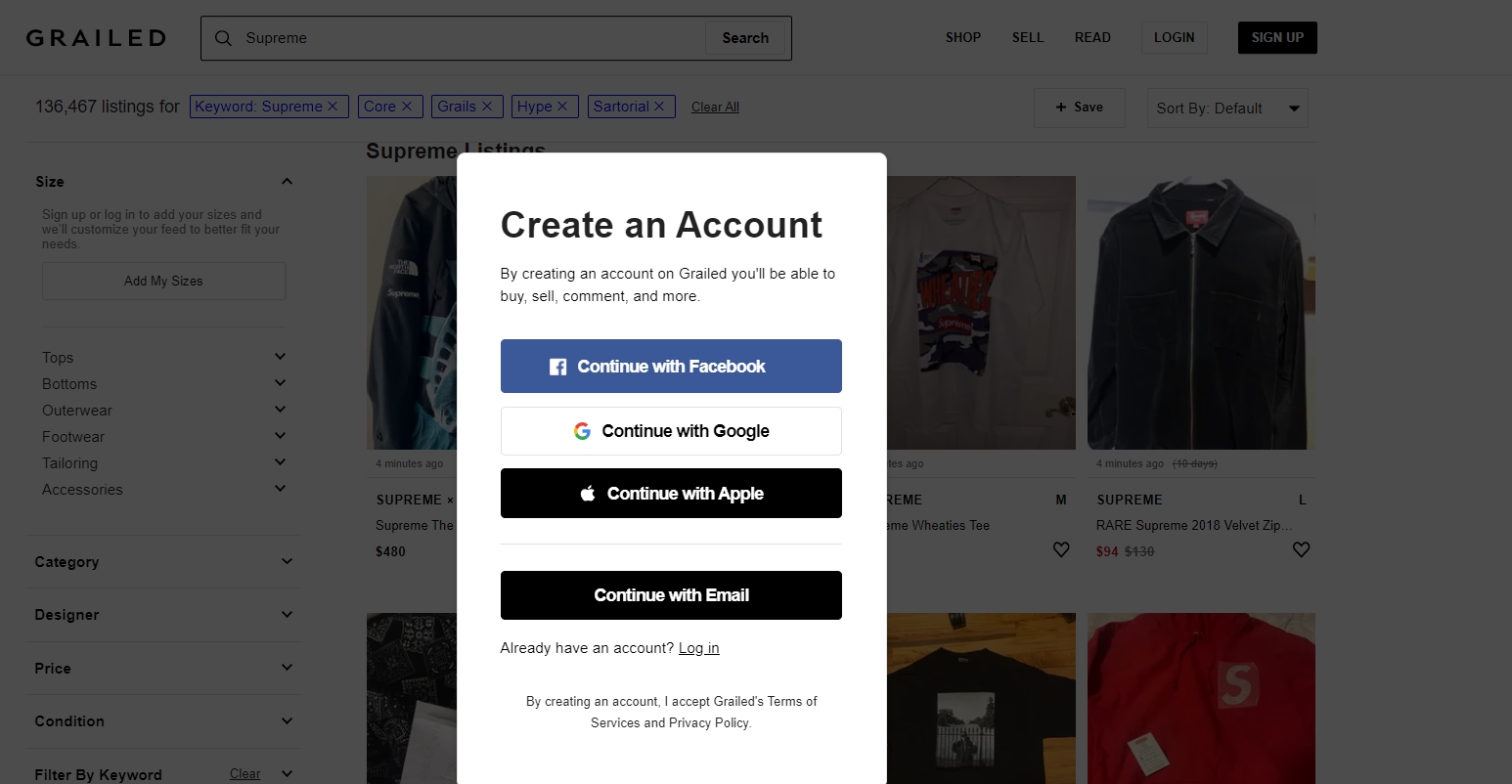
And you can refer to the code here:
def first_run():
    ##Initialize Selenium
    options = Options()
    options.add_argument("user-data-dir=selenium")
    url = "https://www.grailed.com/users/sign_up"
    driver = webdriver.Chrome(WEBDRIVER_PATH, options=options)
    driver.get(url)
    time.sleep(2)

    #Login to account
    email = "PUT GRAILED EMAIL HERE"
    pw = "PUT GRAILED PWORD HERE"

    og_logxpath = "/html/body/div[3]/div[7]/div/div/div[2]/div/div/p[2]/a"
    login_xpath = "/html/body/div[3]/div[7]/div/div/div[2]/div/div/button[4]"
    driver.find_element_by_xpath(og_logxpath).click()
    time.sleep(1) #adds delay
    driver.find_element_by_xpath(login_xpath).click()
    time.sleep(1)

    email_xpath = "/html/body/div[3]/div[7]/div/div/div[2]/div/div/form/div[1]/input"
    pw_xpath = "/html/body/div[3]/div[7]/div/div/div[2]/div/div/form/div[2]/input"
    driver.find_element_by_xpath(email_xpath).send_keys(email)
    driver.find_element_by_xpath(pw_xpath).send_keys(pw)
    final_login_xpath = "/html/body/div[3]/div[7]/div/div/div[2]/div/div/form/button"
    driver.find_element_by_xpath(final_login_xpath).click()

    #uses pickle to save cookies
    #time.sleep(5)
    pickle.dump(driver.get_cookies() , open(COOKIES_PATH,"wb"))
- Used package
fake_useragent: sometimes, cloud security services like CloudFlare prevents web-scraping due to bot-like behavior. To prevent this, we need to use this package and cycle through different user-agents to not look like a bot when using Selenium.
from fake_useragent import UserAgent
ua = UserAgent()
userAgent = ua.random
#print(str(userAgent)) to see which agent is used
options.add_argument(f'user-agent={userAgent}')

url = "https://www.grailed.com/"
driver = webdriver.Chrome(WEBDRIVER_PATH, options=options)
driver.get(url)
-
Runs the following arguments (optimizes performance and ignores anything that is unnecessary):
options = webdriver.ChromeOptions()
options.add_argument("--start-maximized")
options.add_argument("--window-size=1920,1080")
options.add_argument("disable-infobars"); # disabling infobars
options.add_argument("--disable-extensions"); # disabling extensions
options.add_argument("--disable-gpu"); # applicable to windows os only
options.add_argument("--proxy-server='direct://'")
options.add_argument("--proxy-bypass-list=*")
options.add_argument('--ignore-certificate-errors')
options.add_argument('--allow-running-insecure-content')
options.add_argument("--disable-dev-shm-usage"); # overcome limited resource problems
options.add_argument('--headless') #browsers runs hidden locally
Data Collection Steps:
I want to thank Mike Liu for his initial help from his article to help me get started as his code acted as the foundation for mine. You can check out his Medium article which shows how he scraped Grailed. Unfortunately, some of the identifiers he used for some features are outdated as the website changed, so I updated them accordingly and added more features to be scraped in my version, as well as including filters for listings.
To highlight the scraping process after doing the first “set-up” run (I am omitting what each section of code in
sel.pydoes, there is some comments on some lines, but please email me for questions).
Step 1: Given user input (item name and amount to scrape), Selenium goes to the search page of the item.
Step 2: Apply the filters placed by the user, filter first if you want items that are sold only, unsold only, or include both. Then locate all containers (which is each listing) on the page using bs4. We will have to scroll to the amount of listings that the user wants to scrape (using a function that Mike created). There are also containers that are empty, so we have to also track this amount for future functions.
driver, display_amount = check_unlimited_scroll(display_amount, driver)
bs = BeautifulSoup(driver.page_source, 'html.parser')
containers = bs.find_all("div", class_="feed-item")
num_empty = len(bs.find_all("div", class_="feed-item empty-item"))
Step 3: For each container which has information for every listing, we can generalize to scrape the following attributes (Refer to the data dictionary from my GitHub for a definition of each feature). There are helper functions that do the scraping for us.
columns = ['pid', 'b_name', 'title', 'size', 'og_price', 'new_price', 'sold_price', 'is_sold', 'old_date', 'new_date', '%p_change', 'Link'])
Step 4: From step3, we also stored the website link to the listing as it contains a lot more features that we can extract. These features include: listing description, the amount of pictures in the listing, and user-based features (how much feedback seller received, their average feedback, amount of items sold, etc.) We can then also create user dataframes and append any new sellers if we truly wanted to (and update new information on previous sellers), however for the sake of time I have ignored this.
columns = ['uname', 'ship_cost', 'amt_sold', 'amt_feedback', 'amt_listings', 'desc', 'amt_likes', 'prf_link', 'feed_link', 'size_desc', 'loc', 'amt_pics'])
For future reference for myself, if you would like to track amount of images from a container, use the img tag:
numPics = len(bs.find_all("img", class_="PhotoGallery--Thumbnail"))
Step 5: Then, we merge both dataframes using variable Link as the common key.
Step 6: If including both sold or unsold items, merge both append dataframes together, and if necessary export the data to a .csv file so the user can use for future analysis.
Here are .gif’s that shows the process in action:

For unsold listings:
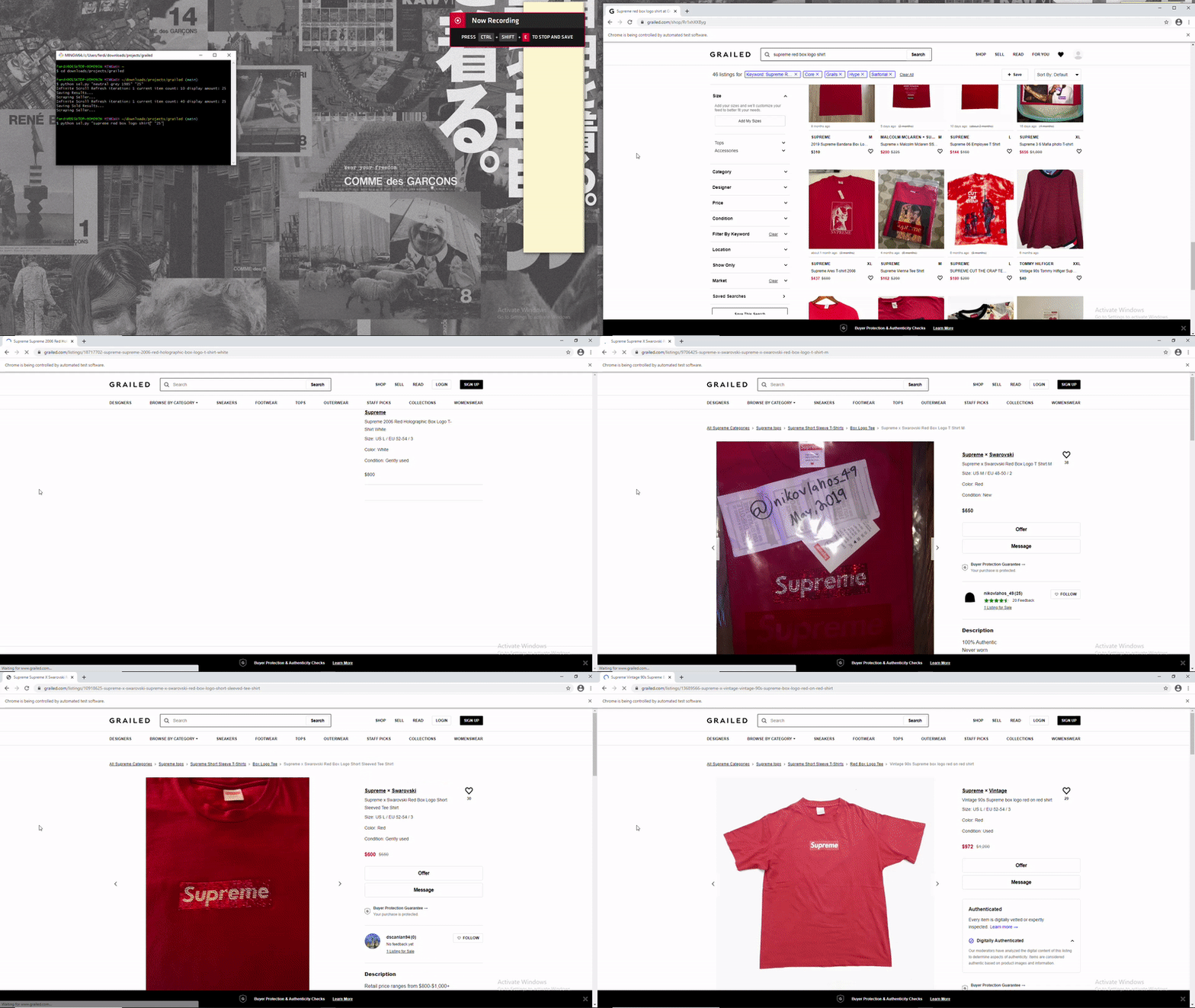
For sold listings: (note that a filter must be applied before cycling through each listing)
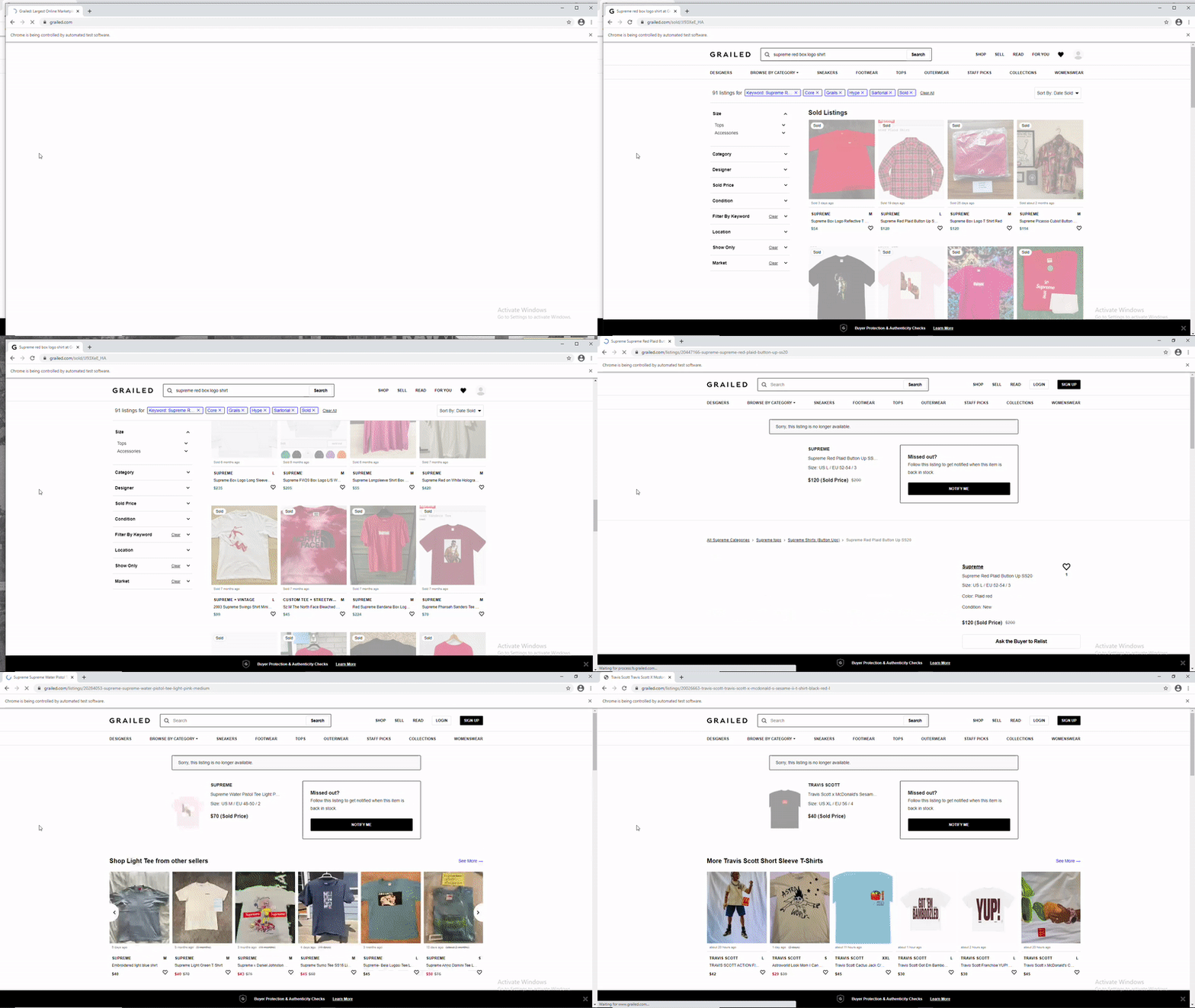
–
Prior Issues Handled:
Unfortunately, there were some problems I ran into during this project:
- Some listings had different amount of filters when trying to filter out
"Sold only", so it was hard to locate that element by PATH as it could be in different locations. I had to hard-code to include each edge-case:
check_sold = "/html/body/div[3]/div[7]/div/div/div[3]/div[1]/div/div[8]/div[2]/div/div/ul/li/label/div/input"
check_sold_2 = "/html/body/div[3]/div[7]/div/div/div[3]/div[1]/div/div[8]/div[2]/div/div/ul/li[2]/label/div/input"
check_sold_3 = "/html/body/div[3]/div[7]/div/div/div[3]/div[1]/div/div[8]/div[2]/div/div/ul/li[3]/label/div/input"
check_sold_4 = "/html/body/div[3]/div[7]/div/div/div[3]/div[1]/div/div[8]/div[2]/div/div/ul/li[4]/label/div/input"

    if len(driver.find_elements_by_xpath(check_sold)) > 0:
        driver.find_element_by_xpath(check_sold).click()
    elif len(driver.find_elements_by_xpath(check_sold_2)) > 0:
        driver.find_elements_by_xpath(check_sold_2)[0].click()
    elif len(driver.find_elements_by_xpath(check_sold_3)) > 0:
        driver.find_element_by_xpath(check_sold_3).click()
    else:
        driver.find_elements_by_xpath(check_sold_4).click()
- Dates were extracted as
'x time ago'. In order to normalize it to one date, I usedrelativedeltasfromdatetimeto normalize it based on today’s date:
"""
returns datetime with "X ... Ago" to relative date from a string
org_date: original date to be converted (str)
"""
def get_past_date(org_date):

    if org_date == "na" or org_date == "nan" or pd.isnull(org_date) or len(org_date.split()) == 1: #handles edge cases
        return "nan"

    fixed = org_date.replace("Sold", "").replace("almost", "").replace("over", "")
    splitted = fixed.split()

    TODAY = datetime.date.today()

    if len(splitted) == 1 and splitted[0].lower() == 'today':
        return str(TODAY.isoformat())
    elif len(splitted) == 1 and splitted[0].lower() == 'yesterday':
        date = TODAY - relativedelta(days=1)
        return str(date.isoformat())
    elif splitted[1].lower() in ['hour', 'hours', 'hr', 'hrs', 'h']:
        date = datetime.datetime.now() - relativedelta(hours=int(splitted[0]))
        return str(date.date().isoformat())
    elif splitted[1].lower() in ['minute', 'minutes', 'm', 'min']:
        date = datetime.datetime.now() - relativedelta(minutes=int(splitted[0]))
        return str(date.date().isoformat())
    elif splitted[1].lower() in ['day', 'days', 'd']:
        date = TODAY - relativedelta(days=int(splitted[0]))
        return str(date.isoformat())
    elif splitted[1].lower() in ['wk', 'wks', 'week', 'weeks', 'w']:
        date = TODAY - relativedelta(weeks=int(splitted[0]))
        return str(date.isoformat())
    elif splitted[1].lower() in ['mon', 'mons', 'month', 'months', 'm']:
        date = TODAY - relativedelta(months=int(splitted[0]))
        return str(date.isoformat())
    elif splitted[1].lower() in ['yrs', 'yr', 'years', 'year', 'y']:
        date = TODAY - relativedelta(years=int(splitted[0]))
        return str(date.isoformat())
    else:
        return "Wrong Argument format"
- I also needed to normalize a
final_pricegiven that there were three prices to choose from (the initial old price, the newest adjusted price, or the sold price). This was necessary for further visualizations.
"""
adds "final_price" variable, which does the following:
1. keeps org_price if listing not sold or updated price
2. keeps new_price if listing not sold
3. keeps sold_price if listing sold
"""
def fix_new_price(sold_prices, new_prices, is_sold, og_price):
    fixed = [x if (z == True) else y for (x,y,z) in zip(sold_prices, new_prices, is_sold) ]
    #now add final_price if only has original_price (not sold and price hasn't changed)
    final_price = [y if (pd.isnull(x) or pd.isna(x) or x == "NA") else x for (x,y) in zip(fixed, og_price)]
    return final_price
Implementing a Dashboard in Streamlit:
As described by the creators:
Streamlit turns data scripts into shareable web apps in minutes. All in Python. All for free. No front‑end experience required.
I wanted to finally implement Streamlit on a personal project, and thought this would be a perfect opportunity. I didn’t want the user to have to use a terminal to run the code locally, so I thought Streamlit Sharing would be a great way that doesn’t use Docker to upload my app online for others to use.
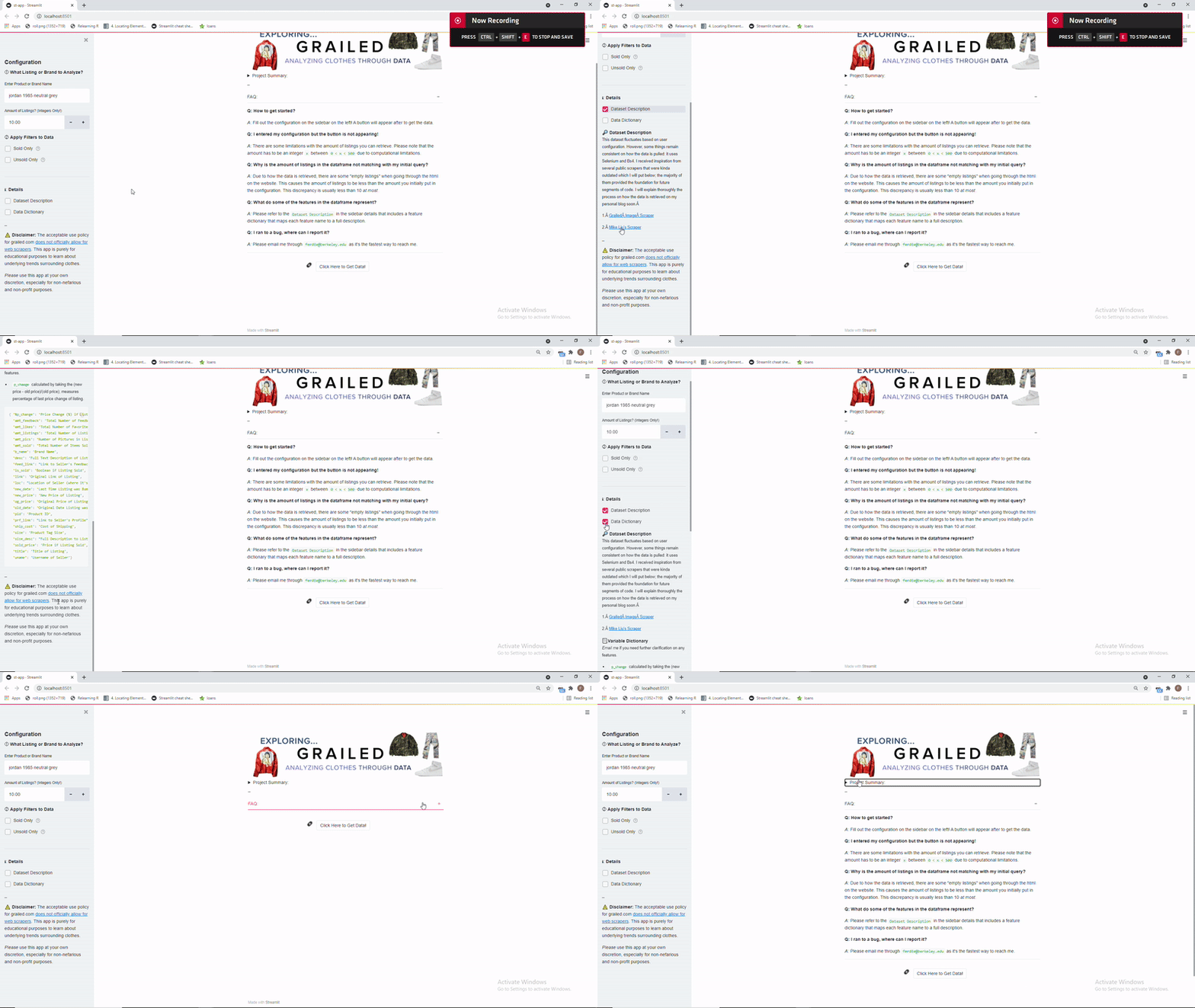
So here is a demo of what the dashboard when it’s run locally in bash through streamlit run "st-app.py"
Demo Videos (Two parts since skipped waiting):
Ignore the sound (was in a call with friends):
The dashboard is like 30% done as I need to include visualizations and more features, but the scraping portion of it is done as users can download the output as a .csv file. Expect more things soon!
You can download the code to run this application locally! Unfortunately, I was not able to deploy this app through Streamlit sharing as it requires a browser to be installed on their server, so Selenium can not be properly run server-side without a browser to use the webdriver.
Update: I just added interactive graphs with tooltips as seen below. You can adjust the x-domain to exclude outliers.
Unfortunately, the way I scraped sold listings are based on the most recent (will randomize in the future), so if you scraped few points the graph will be very biased to recent sold listings.

Future Applications:
Using different models for more accurate imputation, you can use the following:
- Use listing descriptions to capture sentiment for further analysis, can also apply
NLPto create the ‘perfect description’ for that item - Create a
binary classifierto figure out which features are the best to predict which listings will sell for a certain item (we have both sold and unsold listings for each item, can find an item with a lot of listings) Regression modelon price, predict which price is optimal to sell given the features of the item.
–
For more resources, I suggest looking through relevant articles on Grailed Scraping:
Playlists of 2021
Music has always been an important aspect in my life.
Here you can find some highlights of the year: sounds that make me dance at 1am in my garage, lyrics that make me want to sing like a hooligan trying to sound like Mariah Carey, and nostalgic waveforms that make me cry during the hours you realize that memories remain in the past.
–
Favorite Playlist:
January:
February:
March:
April:
May:
June:
July:
August:
September:
October: